
Reference: Product versions and details in this article may have changed since publication.
WS AppServer Package
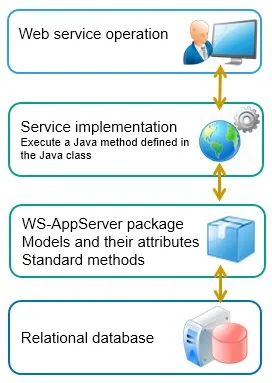
The WS-AppServer package introduces another level of metadata abstraction based on the metadata document generated on a relational database. Refer to the topic Java for more details on generating a metadata document of a relational database. Through the WS-AppServer package you can define more constraints and other static methods in addition to the standard basic methods that are automatically generated.
Developing a WS-AppServer package involves three steps:
Step 1 Create a database metadata document describing the contents of the relational database, i.e. the contained tables, views, and stored procedures.
Step 2 Generate the WS-AppServer package based on the metadata document.
Step 3 Generate the web service interface on the WS-AppServer package to expose the java methods as web service operations as well.
The WS‑AppServer package contains another metadata level based on the metadata definition of the relational database. Tables and views become models in the WS-AppServer package, the columns or fields become attributes of these models. While generating the WS‑AppServer package, you indicate which type of standard methods you wish to be automatically generated with the package:
- All get operations: read a single record or range of records.
- All relational operations: read a set of records based on the foreign key reference, e.g. read the products related to a specific supplier when the product table contains a referential key to the suppliers table.
- All navigational operations: read a next or previous set of records.
Generating a WS-AppServer package creates a number of documents in your workspace:
- The WS-AppServer package itself.
You can modify the contents of the package. - Per table or view, it generates two Java source code files: 1. Base class file containing the Java sources for the basic functionality of the class. For example, for the “Customers” table, a file called “CustomerBase.java” is generated. 2. Extension class file to contain the additional Java source code for functionality that you wish to add to the class. The extension file is called “Customers.java” and will initially be almost empty.
- The JAR (Java Archive) file containing the compiled Java classes and is used to deploy the classes. This file has a jar extension, and is published on the OTPS server.
Note that any changes you make to the WS-AppServer package contents will require you to regenerate the associated Java source code, recompile and re-publish the updated JAR file again. From the collaborative workspace, you can publish the JAR file and when changes have been made to the original source code, the OTPS platform will automatically recompile the Java archive file again.
List of abbreviations
| Abbreviation | Description |
| ANSI | American National Standards Institute |
| BAM | Business Activity Monitoring |
| BER | Business Event Response |
| BPML | Business Process Modeling Language |
| BPMN | Business Process Modeling Notation |
| BPMS | Business Process Management Suite (or System) |
| CAF | Composite Application Framework file extension |
| CAL | Composite Application Logging (framework) |
| CAP | Cordys / Composite Application Package (file extension) |
| CARS | Cordys Admin Repository Server |
| CMC | Cordys Management Console |
| CRUD | Create, Read, Update and Delete, data manipulation operations with a relational database |
| CWS | Collaborative Work Space |
| DTAP | Development, Testing, Acceptance and Production |
| ESB | Enterprise Service Bus |
| HW | HardWare |
| IDE | Integrated Development Environment |
| IP | Internet Protocol |
| JAR | Java ARchive file extension |
| JVM | Java Virtual Machine |
| KPI | Key Performance Indicator |
| LDAP | Lightweight Directory Access Protocol |
| OMG | Object Management Group |
| OTPS | OpenText Process Suite |
| PIM | Process Instance Manager |
| PMO | Process Monitoring Object |
| RDBMS | Relational DataBase Management System |
| SCM | Software Configuration Management |
| SCXML | State Chart XML |
| SOA | Services Oriented Architecture |
| SOAP | Simple Object Access Protocol |
| SQL | Structured Query Language |
| SSU | State Sync-Up |
| SVN | SubVersioN |
| SW | SoftWare |
| W3C | World Wide Web Consortium |
| WfMC | Workflow Management Coalition |
| WSDL | Web Service Definition Language |
| WSI | Web Service Interface |
| WSO | Web Service Operation |
| XML | eXtensible Mark-up Language |
| XPDL | XML Process Definition Language |
Don't miss out on future blog posts! Subscribe to email updates today!